
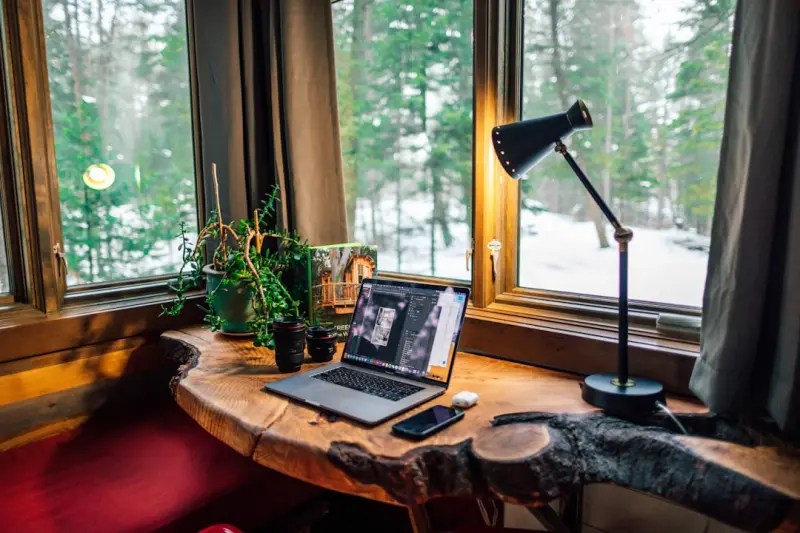
Designing a Home Office That Fuels Focus and Feels Like Home
Working from the couch has its charm, but when the daily grind starts to feel like a marathon on a treadmill, it’s time to give your home office a makeover. A well‑thought‑out workspace does more than just hold a laptop; it can become a catalyst for productivity, creativity, and even a bit of calm amidst the chaos of remote work. Below, I’ll walk you through practical, low‑budget steps that transform any nook into a high‑performance zone—without sacrificing the comforts that make a house feel like a home.
1. Pick the Right Spot: Light, Flow, and Distraction Management
Before you rush to buy a new desk, spend a few minutes surveying the floor plan. The ideal spot balances three fundamentals:
- Natural Light – Sunlight not only lifts mood but also reduces eye strain. Position your desk near a window, but avoid glare on the screen by using sheer curtains or a simple light‑diffusing screen.
- Traffic Flow – Choose a location that isn’t a high‑traffic corridor. You’ll thank yourself when you can slip into “focus mode” without constant interruptions.
- Noise Control – If the living room is a hub of activity, consider a bedroom corner or a hallway alcove. Adding soft textiles (rugs, curtains, cushions) can absorb sound and create a quieter atmosphere.
When natural light isn’t an option, a well‑placed lamp with a warm hue can simulate daylight. For those looking for a subtle tech boost, you can explore energy‑saving lighting tips that mimic sunrise and sunset, keeping your circadian rhythm in sync.
2. Ergonomics: Comfort That Keeps You Moving
Spending hours hunched over a laptop is a recipe for neck and back pain. A few ergonomic tweaks can make a world of difference:
- Desk Height – Your elbows should hover at a 90‑degree angle when typing. If a standard desk is too high, raise your chair or add a keyboard tray.
- Chair Support – Invest in a chair with lumbar support. If budget constraints are real, a small pillow or rolled‑up towel can fill the gap.
- Screen Position – The top of your monitor should sit at eye level, about an arm’s length away. Use a stack of books or a monitor riser to achieve the correct height.
- Movement Breaks – Set a timer for every 45‑60 minutes. Stand, stretch, or do a quick walk‑around. These micro‑breaks keep circulation flowing and prevent stiffness.
Incorporating a standing desk, even a DIY version made from a sturdy box, lets you switch between sitting and standing throughout the day, boosting energy and reducing fatigue.
3. Acoustic Comfort: Taming the Soundscape
Background noise can erode concentration faster than a cluttered desk. Simple acoustic solutions can dramatically improve focus:
- Rugs and Carpets – Soft floor coverings absorb sound reflections, especially in rooms with hard flooring.
- Wall Hangings – Fabric wall art, tapestries, or even acoustic panels (you can DIY with foam and fabric) reduce echo.
- White Noise – A low‑volume fan or a white‑noise app can mask distracting sounds like traffic or household chatter.
If you love plants, they double as air purifiers and natural sound dampeners. A few leafy companions—such as snake plant, pothos, or peace lily—create a quieter, healthier environment.
4. Declutter with Purpose: The Art of Curated Minimalism
Clutter is the silent productivity killer. The trick isn’t to strip every surface bare, but to curate what stays.
- Zone Your Space – Define zones for work, storage, and inspiration. Keep only work‑related items in the immediate zone; store everything else in drawers or cabinets.
- Adopt a “One‑In, One‑Out” Rule – Every time you bring a new gadget or décor item into the office, remove something else. This prevents accumulation.
- Use Hidden Storage – A desktop organizer with compartments, a filing box that slides under the desk, or a wall‑mounted pegboard can keep tools within reach but out of sight.
When you need fresh ideas on how to organize, check out the space‑saving strategies article for clever ways to maximize even the smallest corners.
5. Personal Touches: Make It Yours Without Over‑Stimulation
A workspace that feels too sterile can drain motivation. Adding personal elements fosters a sense of ownership and comfort, but balance is key.
- Artwork – Choose a piece that inspires you, whether it’s a motivational quote, a serene landscape, or a bold abstract. Limit it to one or two items to avoid visual clutter.
- Plants – Beyond acoustics, plants improve air quality and add a splash of green that reduces stress.
- Scent – A subtle diffuser with lavender or citrus can create a calming backdrop. Keep it light; strong scents can become distracting.
Remember, the goal is to create a sanctuary that supports focus, not a lounge that lulls you into daydreams.
6. Technology That Works, Not Distracts
Tech is a double‑edged sword. Here’s how to make it work for you:
- Dedicated Devices – If possible, separate work and personal devices. This reduces the temptation to scroll social media during work hours.
- App Blockers – Use productivity apps that limit access to distracting websites during focus periods.
- Streamlined Software – Keep only essential apps open. Close tabs you’re not actively using to minimize mental clutter.
If you’re interested in how digital habits impact wellbeing, the digital detox guide offers deeper insights on carving out tech‑free intervals.
7. Climate Control: Temperature and Air Quality Matter
Extreme temperatures can sap concentration. Aim for a comfortable 68‑72°F (20‑22°C). If you don’t have central heating/cooling, a small portable fan or space heater can help regulate the micro‑climate.
Air quality is equally crucial. Open a window for fresh air when weather permits, or use a compact air purifier. Adding a few houseplants, as mentioned earlier, also helps filter pollutants naturally.
8. Routine and Boundaries: The Invisible Framework
Even the most beautifully designed office won’t be effective without a clear routine.
- Start‑Up Ritual – Begin each day with a short ritual: a coffee, a quick stretch, and a glance at your to‑do list. This signals to your brain that it’s work time.
- End‑Of‑Day Signal – When the workday ends, close your laptop, turn off the lamp, and physically move away from the desk. This helps draw a mental line between work and home life.
- Scheduled Breaks – Use the Pomodoro technique (25 minutes work, 5 minutes break) or any interval that suits you. Consistent breaks preserve focus and prevent burnout.
9. Future‑Proofing: Flexibility for Changing Needs
Remote work trends are evolving, and your office should be adaptable. Consider modular furniture that can be reconfigured for video calls, brainstorming sessions, or even a quick yoga stretch. Keeping cords organized with zip ties or a cable management box ensures the space remains tidy as you add new gadgets.
10. Celebrate the Wins
Finally, acknowledge the small victories. Did you finish a project ahead of schedule? Celebrate with a favorite snack at your desk or a short walk outside. Positive reinforcement reinforces the habit of maintaining a productive environment.
Designing a home office that blends focus, comfort, and personality isn’t a one‑size‑fits‑all project. It’s an ongoing experiment—tweak, test, and iterate until the space feels just right for you. With intentional choices around lighting, ergonomics, acoustics, and personal touches, you’ll create a hub that not only supports work but also nurtures well‑being.

Seth Samual is a name that's quickly becoming synonymous with compelling and insightful writing. As a freelance writer, Seth has carved a niche for himself by delivering high-quality content across a diverse range of subjects.
Related Posts
Boost Your Home’s Energy IQ: Smart, Simple Hacks for Every Room
Learn how to audit, optimize, and smarten up your home’s energy use with easy, actionable steps—... Read More

Crafting a Home Wellness Nook That Feeds Body and Soul
A step‑by‑step guide to building a home wellness nook that balances light, scent, sound, and tex... Read More

Let the Sun In: Simple Strategies to Flood Your Home with Natural Light
Learn how to transform any space with sunlight through mirrors, light‑reflective surfaces, strateg... Read More
Top Posts

Micro‑Goal Mastery: Tiny Wins for a Resilient Mindset
Discover the science behind micro‑goals and a step‑by‑step system to embed tiny, dopamine‑boosting actions into your workday, creating lasting mental re...Read More

Screen Sabbaticals: Reclaiming Mental Space in a Hyperconnected World
A screen sabbatical isn’t a tech detox fad; it’s a structured, intentional break that clears mental clutter, enhances focus, and nurtures wellbeing. Learn p...Read More

From Drab to Fab: Transform Your Balcony into a Lush Vertical Garden
Discover step‑by‑step tips to convert your balcony into a vibrant vertical garden that feeds your kitchen and delights the senses....Read More
Smart Personal Care: How AI and Sustainable Design Are Redefining Daily Routines
Discover the future of personal care where technology meets sustainability—smart devices, data‑driven routines, and refillable packaging combine to create a...Read More
0 Comments
Post Comment
You will need to Login or Register to comment on this post!