
Smart Scheduling for a Seamless Home: Turn Everyday Appliances into Quiet Helpers
When I first moved into my downtown loft, the constant hum of the dishwasher, the late‑night kettle, and the blinking router lights felt like a never‑ending chorus of reminders that my home was still catching up to my life. I love a well‑run household, but I also crave the mental space to focus on creative work, family moments, and a little‑bit of quiet. That’s when I discovered the transformative power of smart scheduling—using timers, voice commands, and a little bit of foresight to let my appliances run on my terms, not the other way around.
In this post, I’ll walk you through how to set up a smart‑first routine that saves energy, reduces noise, and frees up mental bandwidth. You’ll learn practical steps for every room, see real‑world examples of what works (and what doesn’t), and pick up a handful of pro tips that keep the system humming without you having to lift a finger. Ready to make your home work for you? Let’s dive in.
Why Smart Scheduling Is More Than a Convenience
Before we get into the “how,” let’s talk about the “why.” Smart scheduling isn’t just about pushing a button from your phone; it’s a mindset shift that turns everyday chores into background processes. Here are three core benefits that will change the way you view home management:
- Energy efficiency. Running appliances during off‑peak hours can shave up to 30% off your electricity bill, especially if your utility offers time‑of‑use pricing.
- Noise reduction. Scheduling noisy devices like the dishwasher or washing machine to run while you’re out or asleep keeps your living spaces tranquil.
- Mental clarity. When tasks are automated, you free up cognitive load for the things that truly matter—whether that’s a work project, a hobby, or simply unwinding with a book.
All of this adds up to a home that feels less like a series of obligations and more like a supportive partner.
Getting Started: The Essentials You’ll Need
First, let’s make sure you have the right building blocks. You don’t need a full‑blown smart home ecosystem to see results, but a few key tools will set you up for success:
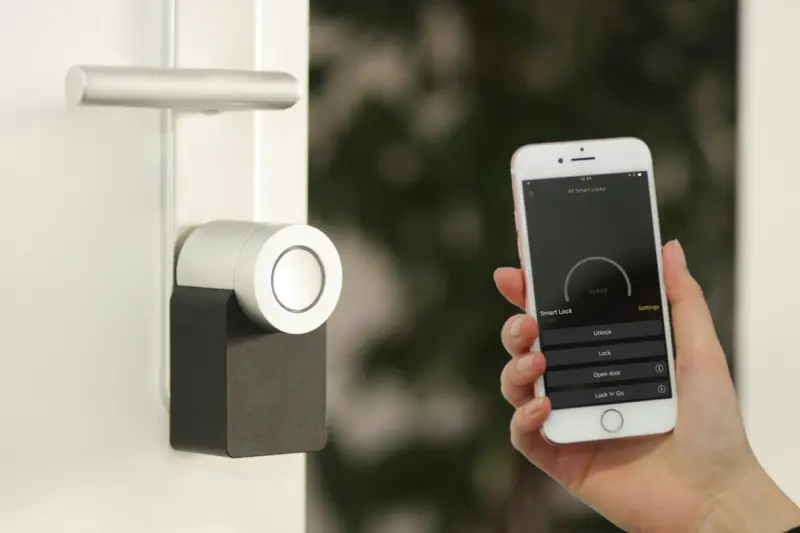
- Smart plugs or switches. These are the workhorses that let you control any plug‑in device via an app or voice assistant.
- Scheduling app or hub. Most major platforms (Google Home, Apple HomeKit, Amazon Alexa) include built‑in scheduling, but dedicated hubs like Samsung SmartThings add extra flexibility.
- Reliable Wi‑Fi. A strong signal ensures your devices stay connected and respond promptly.
- Power usage monitor (optional). Plug in a device like the Sense or TP‑Link Kasa to see real‑time consumption and fine‑tune your schedule.
Once you’ve gathered these pieces, you’ll be ready to start mapping out a schedule that aligns with your daily rhythm.
Mapping Your Day: From Sunrise to Sunset
Think of your day as a canvas. Each hour holds a natural flow of activity, and the goal is to let your appliances paint themselves in the background. Here’s a sample timeline that many busy professionals find helpful (feel free to adapt it to your own routine):
- 5:30 am – 7:00 am: Coffee maker and toaster on a 15‑minute timer so you wake up to a fresh brew without a frantic rush.
- 7:30 am – 8:30 am: Dishwasher runs while you’re out grabbing breakfast; set a “quiet mode” if your model supports it.
- 12:00 pm – 1:00 pm: Schedule the washing machine for a mid‑day cycle, taking advantage of lower rates and keeping laundry out of the evening.
- 6:00 pm – 7:00 pm: Turn on the slow‑cook or instant‑pot to have dinner ready by the time you sit down.
- 10:00 pm – 11:00 pm: Dim the lights, close smart blinds, and cue a “wind‑down” routine that includes turning off all non‑essential devices.
This flow not only reduces noise during peak home‑time but also spreads energy consumption more evenly.
Room‑by‑Room Playbook
Now let’s break down each space. I’ll share my personal settings, why they work, and a few variations for different lifestyles.
Kitchen: The Quiet Chef’s Companion
The kitchen is the epicenter of most household activity, yet it’s also where the most noise and energy usage occur. Here’s how to tame it:
- Smart Plug the coffee maker. Use a 5‑minute “brew” schedule that starts just before you usually get up. Pair it with a voice command (“Hey Google, start my coffee”) for flexibility.
- Set the dishwasher to “late night.” Most newer models have a delayed start function. Choose a window between 11 pm and 2 am to keep the clatter out of conversation zones.
- Pre‑program the oven. Some smart ovens let you load a recipe and set a finish time. You can walk in to a perfectly baked dish without the oven timer beeping in the background.
- Organize cords. A cluttered counter can become a tripping hazard, especially when you have multiple smart plugs. I love the strategies from Unlock Hidden Storage—use magnetic strips and cord organizers to keep everything tidy.
Living Room: A Calm, Connected Hub
The living room is where you relax, work, and entertain. Keep it serene:
- Smart lighting scenes. Program warm, dim lights for evenings and bright, cool tones for daytime focus. Tie the scenes to your “wind‑down” routine.
- Speaker scheduling. If you love background music, set a timer for the smart speaker to turn off after a set period. No more “oops, I forgot the music is still playing” moments.
- Air purifier automation. Link the purifier to a humidity sensor so it kicks in only when needed, saving electricity.
Home Office: Efficiency Meets Focus
Working from home demands a balance of productivity and comfort. Here are my top automation hacks:
- Computer power schedule. If you use a desktop, set a smart plug to turn it on 10 minutes before you start work and off an hour after you log out.
- Desk lamp with circadian rhythm. Choose a lamp that adjusts color temperature throughout the day, reducing eye strain.
- Wi‑Fi priority rules. Some routers let you allocate bandwidth to specific devices during work hours, ensuring video calls stay crisp.
Bedroom: The Sanctuary of Sleep
Sleep quality is directly tied to how you manage light, temperature, and noise. Use smart scheduling to create an ideal sleep environment:
- Gradual dimming. Set your smart bulbs to fade to 0% over a 30‑minute window before bedtime.
- Temperature control. Program your thermostat to drop a few degrees at night—most people sleep better in cooler rooms.
- White‑noise machine. A plug‑in white‑noise unit can be set to start at bedtime and turn off after you’re likely asleep.
Adding Life to Your Schedule: Greenery Meets Technology
Plants are the unsung heroes of a healthy home, and they pair beautifully with smart scheduling. In my own space, I’ve integrated a low‑maintenance Miniature Indoor Forest into the kitchen window. By attaching a smart moisture sensor to the soil, the system alerts me (or even triggers a tiny water pump) when the plants need a drink. The result? A thriving mini‑forest that cleans the air and adds a calming visual cue—without me having to remember watering schedules.
If you’re not ready for a full‑scale indoor forest, start small. A single pothos on a shelf with a plug‑in grow light set on a 12‑hour timer can make a huge difference in mood and air quality.
Advanced Tips: Layering Automation for Maximum Impact
Once you’re comfortable with basic schedules, it’s time to add layers that respond to real‑time conditions. Here are a few of my favorite “if‑then” combos:
- If the outdoor temperature drops below 50°F, then raise the thermostat 2 degrees. This prevents the heating system from overworking when you’re still out.
- If the laundry sensor detects a full load, then send a phone notification. No need to guess when the washer finishes.
- If the TV is on after 9 pm, then dim the living‑room lights automatically. Keeps the ambiance cozy and reduces blue‑light exposure.
Most platforms let you create these routines through a simple drag‑and‑drop interface—no coding required.
Keeping the System Simple: Avoiding “Automation Overload”
It’s tempting to automate every little thing, but too many rules can become a headache to maintain. Here’s how to keep it lean:
- Start with three core routines. Choose the kitchen, bedroom, and home office as your pillars.
- Document your schedules. A quick spreadsheet or a notes app entry helps you track what’s running when.
- Review monthly. Check energy reports and adjust times if you notice patterns shifting (e.g., a new work schedule).
By focusing on high‑impact areas, you’ll reap the biggest rewards without drowning in settings.
Real‑World Success Stories
Below are two quick anecdotes from readers who tried my approach:
- Emily, a freelance graphic designer: After automating her dishwasher and coffee maker, she reported a 20% reduction in her utility bill and said she no longer “wakes up to the sound of dishes clanking.”
- James, a remote software engineer: Implemented a “night‑mode” that turns off all non‑essential devices at 10 pm, leading to a measurable improvement in sleep quality (he tracked this using a smartwatch). He also added a smart plug to his standing desk lamp, which now only lights up during work hours.
Future‑Proofing: Preparing for New Tech
The smart home market is evolving fast. As new devices roll out—think AI‑driven energy managers or appliances that learn your habits—you’ll want a flexible foundation. Here’s how to stay ready:
- Choose a platform with broad compatibility. Google Home, Alexa, and Apple HomeKit all support a wide range of devices.
- Keep firmware updated. Security patches often bring performance improvements that keep your routines smooth.
- Stay informed. Subscribe to newsletters from your favorite device manufacturers; many release beta features you can test early.
When the next wave of smart appliances lands on your doorstep, you’ll already have a solid schedule framework to integrate them seamlessly.
Wrapping Up: Your Home, Your Rhythm
Smart scheduling is a quiet revolution—one that turns the background noise of daily chores into a well‑orchestrated symphony. By taking a few deliberate steps, you can cut energy waste, hush unwanted sounds, and reclaim mental space for the things you love. Remember, the goal isn’t to become a tech‑obsessed guru; it’s to let technology handle the repetitive, so you can focus on living.
Give it a try this week. Pick one room, set up a smart plug, and schedule a single appliance. Watch how the simple act of “doing it on autopilot” reshapes your day. Then, expand gradually, layer in the advanced routines, and soon you’ll have a home that truly runs with you, not against you.

Laura Wilson is a freelance writer specializing in the dynamic and ever-evolving field of health. With a passion for translating complex medical information into accessible and engaging content, Laura brings a wealth of knowledge and a fresh perspective to topics ranging from preventative care and nutrition to cutting-edge research and innovative treatments.
Related Posts

Designing a Remote‑Work Ready Home That Fuels Focus and Well‑Being
Discover how to remodel your living space into a remote‑work ready environment with zones for focu... Read More

Turn Your Hallways into Power Zones: Simple Home Hacks for Energy and Focus
Learn to upgrade your hallway with layered lighting, smart storage, sound management, and micro‑ri... Read More
Budget-Friendly Acoustic Upgrades for a Peaceful Home Office
Discover practical, low‑cost ways to tame noise in your home office, using rugs, curtains, DIY pan... Read More
Top Posts

AI as a Strategic Co‑Creator: Re‑Defining Decision‑Making in the Enterprise
This article reveals how AI can transition from a backstage assistant to a strategic co‑creator, outlining practical steps for leaders to embed AI into decisi...Read More

Employment as a Platform: Turning Jobs into Self‑Service Marketplaces
A deep dive into the emerging platform approach to employment, showing how self‑service job marketplaces, transparent compensation, and modular contracts are ...Read More

Negotiating Flexible Work Contracts in the Modern Gig Economy
Discover proven strategies for negotiating flexible gig contracts, from data‑driven pricing to AI‑enhanced drafting, ensuring fair pay and sustainable clien...Read More

Turn Your Home into a Sensory Sanctuary: Practical Tips for Everyday Calm
Learn how to create a sensory sanctuary at home with practical tips on lighting, sound, texture, scent, low‑tech automation, and personal touches that boost w...Read More
0 Comments
Post Comment
You will need to Login or Register to comment on this post!