
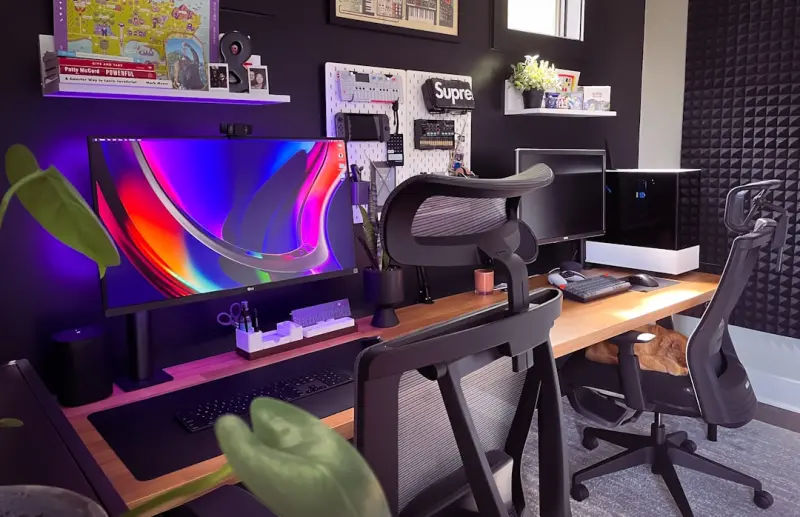
Why Your Home Office Deserves a Smart Makeover
Working from home has shifted from a perk to a permanent reality for many of us. Yet, while we’ve invested in laptops and ergonomic chairs, the surrounding environment often remains an afterthought. The truth is, the space you spend most of your waking hours in silently dictates how well you focus, how creatively you think, and even how healthy you feel. A strategic, budget‑friendly overhaul can turn a makeshift desk corner into a productivity powerhouse.
Start with the Foundations: Light, Air, and Sound
Before you rush to buy the latest standing desk, ask yourself three simple questions:
- Does the room get enough natural light? Sunlight regulates circadian rhythms, boosts mood, and reduces eye strain.
- Is the air circulating? Stale air can make you feel sluggish; a touch of fresh breeze does wonders.
- How noisy is the space? Background chatter, street traffic, or the hum of appliances can hijack concentration.
Addressing these fundamentals doesn’t require a full remodel. A few well‑chosen tweaks can dramatically shift the atmosphere. For instance, simple acoustic fixes—like a decorative wall tapestry or a small bookshelf filled with books—absorb echo and create a quieter nook. Meanwhile, a portable air purifier or a strategically placed houseplant can improve indoor air quality without breaking the bank.
Lighting: Harness Natural and Artificial Sources
Natural daylight is the gold standard. If your office faces a window, position your monitor so that the screen is perpendicular to the light source, minimizing glare. When natural light is limited, invest in a daylight‑mimicking LED lamp that adjusts color temperature throughout the day—cool blues for focus in the morning, warm amber for relaxation in the late afternoon.
Layered lighting is another secret weapon: combine ambient ceiling lights, task lighting for the desk, and a subtle accent lamp. This not only reduces eye fatigue but also signals to your brain when it’s time to work versus unwind.
Temperature Tweaks for Comfort
Most of us overlook temperature as a productivity factor, yet a room that’s too hot or too cold can drain mental stamina. The sweet spot for most people hovers around 68–72°F (20–22°C). If you can’t adjust the thermostat globally, consider localized solutions:
- A small fan or a portable heater directed at your workstation.
- Thermal curtains that keep heat out in summer and lock it in during winter.
- A desk mat made of breathable material to keep your feet comfortable.
These temperature tweaks are inexpensive but have a measurable impact on alertness and comfort.
Ergonomics Without the Price Tag
Ergonomic design is often associated with pricey furniture, but the core principles are simple:
- Monitor height: The top of your screen should be at or slightly below eye level.
- Keyboard and mouse placement: Keep elbows at a 90‑degree angle, wrists neutral.
- Seat support: Use a lumbar pillow or a rolled‑up towel if your chair lacks proper back support.
If you already own a regular office chair, add a seat cushion and an adjustable laptop stand. Pair these with a footrest (even a sturdy box works) to maintain proper posture and reduce strain on the lower back.
Smart Organization: Declutter Digitally and Physically
Clutter is the silent enemy of focus. The first step is to adopt a two‑tiered organization system:
- Digital declutter: Use cloud‑based folders with clear naming conventions. Archive old files, and set a weekly “inbox zero” ritual.
- Physical declutter: Keep only essential items on your desk—think a notebook, a pen, and perhaps a small plant. Everything else belongs in drawers or shelving.
Integrate micro‑break strategies into this system: a quick 30‑second stretch each time you file a document reinforces the habit of resetting your workspace.
Technology: Make Your Office Smarter, Not More Complicated
Smart home tech can streamline workflows without adding cognitive load. Here are three budget‑friendly gadgets to consider:
- Voice‑activated assistants: Use them to set timers, add calendar events, or control lighting without leaving your seat.
- Smart plugs: Automate your desk lamp or coffee maker to power on at a set time, establishing a morning routine.
- Wi‑Fi extenders: Ensure a stable internet connection, especially if your office is far from the router.
When selecting devices, prioritize those that integrate with existing platforms (e.g., Apple HomeKit, Google Home) to keep the ecosystem simple.
Personal Touches: The Psychology of Inspiration
Our surroundings shape our mindset. A few thoughtful details can turn a sterile workspace into a place that fuels creativity:
- Artwork: Choose a piece that resonates with you—whether it’s an abstract print or a framed photograph of a favorite travel spot.
- Scent: A subtle diffuser with citrus or peppermint can boost alertness. Keep it light; strong fragrances may become distracting.
- Plants: Besides air‑purifying benefits, a touch of green reduces stress. Succulents, spider plants, or a small fiddle‑leaf fig are low‑maintenance options.
Creating Zones: Work, Break, and Transition
If space permits, divide your room into distinct zones:
- Focus Zone: Your desk area with minimal visual distractions.
- Recharge Zone: A comfortable chair or floor cushion for reading, stretching, or short meditation.
- Transition Zone: A small mat or rug that you step on when you finish work, signaling a mental shift to “off‑clock” mode.
Even in a compact apartment, you can create these zones by arranging furniture strategically—for example, place a floor lamp and a cozy pouf opposite the desk to serve as the recharge area.
Maintenance Routines: Keep the Space Fresh
A well‑designed office can fall into disrepair if neglected. Adopt a simple maintenance schedule:
- Daily: Wipe down surfaces, clear the desk of stray papers, and reset any gadgets.
- Weekly: Dust electronics, water plants, and reorganize digital files.
- Monthly: Deep clean carpets or rugs, check for cable wear, and reassess ergonomics.
These habits reinforce the feeling that the space is yours to nurture, which in turn sustains motivation.
Budget Breakdown: Smart Upgrades Under $300
Here’s a sample checklist for a cost‑effective makeover:
| Item | Estimated Cost |
|---|---|
| LED daylight lamp | $40 |
| Portable air purifier | $70 |
| Acoustic wall tapestry | $30 |
| Adjustable laptop stand | $25 |
| Lumbar support pillow | $20 |
| Smart plug (2‑pack) | $25 |
| Desk plant + pot | $30 |
| Footrest | $35 |
| Essential oils diffuser | $35 |
| Misc. cables & organizers | $20 |
Total: $350. You can trim the list further by repurposing items you already own—perhaps a decorative pillow doubles as a footrest, or a spare bookshelf serves as acoustic padding.
Final Thoughts: Your Office, Your Edge
In the era of remote work, a thoughtfully curated home office is more than a convenience; it’s a competitive advantage. By addressing light, sound, temperature, ergonomics, and personal inspiration, you create a self‑reinforcing ecosystem that fuels focus, creativity, and well‑being. The best part? Most of these upgrades are incremental, allowing you to iterate and improve over time without a massive upfront investment. Start small, stay consistent, and watch your productivity—and your enjoyment of home—soar.

Ryan Stuart is a seasoned freelance features writer, editor, and professional photographer with a passion for exploring the world and capturing its beauty through words and images.
Related Posts

Quiet Corners: Mastering Acoustic Comfort in Open‑Plan Homes
Learn how to turn noisy open‑plan spaces into serene retreats using soft furnishings, DIY acoustic... Read More

Illuminate Your Home: A Practical Guide to Light‑Crafted Living
Discover a step‑by‑step guide to mastering natural and artificial light at home, from auditing f... Read More

Embracing Natural Materials: A Low‑Tech Path to a Healthier Home
Explore low‑tech strategies for using natural wood, stone, and textiles to boost comfort, air qual... Read More
Top Posts

Zero‑Waste Personal Care: Crafting a Sustainable Bathroom Ritual
Learn practical steps to transform your bathroom into a sustainable sanctuary, from refill stations and DIY products to eco‑friendly lighting and natural scen...Read More

Reclaiming the Front Porch: A Year‑Round Sanctuary for Mind, Body, and Community
Discover how to turn an underused front porch into a flexible, year‑round sanctuary that enhances mental health, fosters community, and adds functional living...Read More

Minimalist Skincare: Curating a Multi‑Task Routine for Real‑World Simplicity
Learn to build a minimalist skincare cabinet using versatile, effective products that simplify daily routines while delivering real results for busy lives....Read More

How a Garden Desk Can Transform Your Home & Garden Lifestyle
Explore the rise of garden desks, learn design tips, and see how this outdoor office can elevate your productivity, mental health, and eco‑friendly lifestyle....Read More
0 Comments
Post Comment
You will need to Login or Register to comment on this post!