
Reimagining the Kitchen Counter: A DIY Power Station for Everyday Life
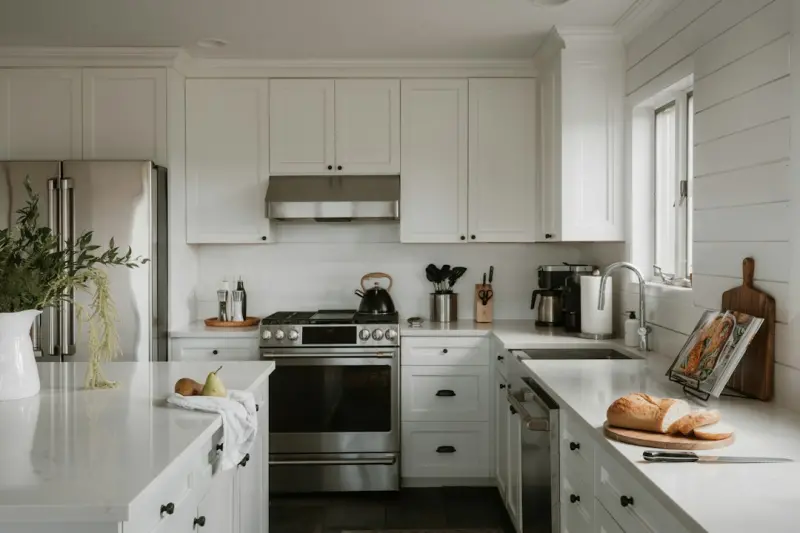
When I first moved into my downtown loft, the kitchen was a sleek, minimalist box of stainless steel and quartz. It looked like a showroom, but it also felt like a barren plain—nothing but a place to prep meals and dump dishes. Over the months that followed, I started to treat that counter like a blank canvas. What began as a series of half‑baked experiments turned into a full‑blown home productivity hub that now powers my mornings, fuels my creativity, and even doubles as a calming retreat after a long day.
In this post I’ll walk you through the philosophy behind the transformation, the step‑by‑step process I used, and the unexpected benefits that spilled over into other rooms of the house. Whether you’re a remote worker, a hobbyist chef, or just someone who likes the idea of a tidy, functional space, you’ll find practical tips you can apply without breaking the bank.
Why the Kitchen Counter?
Most of us think of the kitchen as a one‑purpose zone: cooking. But if you look closer, the countertop is actually a high‑traffic, ergonomically‑friendly surface that’s already wired into the plumbing, electricity, and natural light of your home. By leveraging those existing assets, you can create a multi‑functional workstation that feels less like a makeshift solution and more like a thoughtfully designed extension of your living space.
- Proximity to food and drink: No more running to the fridge for a glass of water when you’re deep in a project.
- Built‑in power sources: Most modern kitchens have outlets under the cabinets—perfect for charging laptops and phones.
- Natural lighting: If you have a window above the sink, you can harness natural light in ways that boost focus and mood.
But the real magic isn’t in the hardware; it’s in the mindset shift: treating the kitchen counter not just as a place to chop vegetables, but as a dynamic stage where daily rituals—work, learning, relaxation—play out.
Step 1: Declutter and Define Zones
The first rule of any successful redesign is clarity. I started by pulling everything off the counter and sorting into three buckets: essential, optional, and discard. Essential items are those you truly need daily—your coffee maker, a good knife, a cutting board. Optional items are the decorative jars, extra gadgets, and the occasional cookbook. Discard is anything that doesn’t belong on the counter at all.
Once I had a clean slate, I sketched a rough layout on paper, dividing the countertop into three zones:
- The Command Center: A small area dedicated to tech—laptop, tablet, charging station, and a minimalist desk lamp.
- The Refresh Station: A spot for a high‑quality water pitcher, a coffee or tea setup, and a small fruit bowl for quick snacks.
- The Creative Corner: Space for a sketchpad, a stack of your favorite magazines, or a set of dice for a quick game break.
Mapping zones helps you avoid the “everything everywhere” chaos that can turn a sleek counter into a clutter graveyard.
Step 2: Choose the Right Accessories
Now that the zones are defined, it’s time to select accessories that are both functional and aesthetically cohesive. Here’s what worked for me:
- Elevated laptop stand: A bamboo riser raises the screen to eye level, reducing neck strain.
- Magnetic cable organizer: Keeps charging cords tidy and prevents accidental unplugging.
- Compact drawer unit: Slides under the counter to hide stationery, spare batteries, and other small tools.
- Glass terrarium: Adds a touch of greenery without taking up floor space, and the visual break helps maintain playful resilience during long work sessions.
When selecting pieces, aim for materials that complement your kitchen’s existing palette—think reclaimed wood, matte black metal, or soft pastel ceramics. Consistency in texture and color reduces visual noise and makes the space feel intentional.
Step 3: Optimize Lighting
Even the best layout will falter under poor lighting. While most kitchens have overhead fluorescence, it can cast harsh shadows that fatigue the eyes. Here’s how to upgrade without a full electrical overhaul:
- LED strip under cabinets: A warm‑white strip adds ambient glow that highlights the countertop without glare.
- Adjustable task lamp: Position it over the Command Center to focus light where you need it most.
- Window treatment: A light, sheer curtain diffuses direct sunlight, creating a gentle, even illumination that mimics natural daylight.
Good lighting not only improves productivity but also enhances the visual appeal of your new zones, making you more likely to keep the area organized.
Step 4: Integrate Small Rituals
The kitchen is a hub of habit—coffee brewing, meal prep, washing dishes. By embedding small, intentional rituals into your new counter setup, you reinforce the space’s purpose and make it a source of comfort.
- Morning “Power‑Up” routine: While the coffee brews, fire up your laptop, review your top three tasks, and glance at the day’s calendar.
- Midday “Reset” break: Swap the laptop for a sketchpad or a quick game of cards from the Creative Corner. This micro‑break restores focus without the need to leave the house.
- Evening “Wind‑Down” ritual: Turn off the laptop, dim the LEDs, and sip tea while reviewing the day’s accomplishments. The terrarium’s gentle sway can serve as a visual cue to transition into relaxation mode.
These micro‑rituals turn the kitchen counter from a passive surface into a dynamic engine that fuels both work and wellbeing.
Step 5: Maintain Momentum
Any redesign is only as good as its upkeep. Here are the habits that keep the counter functional over the long term:
- End‑of‑day sweep: Spend two minutes clearing any loose items, wiping the surface, and resetting the zones.
- Weekly declutter session: Remove anything that has migrated into the Command Center but doesn’t belong there (old receipts, stray chargers, etc.).
- Monthly refresh: Rotate a decorative item or swap a plant for a new variety to keep the space feeling fresh.
Consistency prevents the counter from slipping back into a “dumping ground” and ensures the investment you made in design continues to pay dividends.
Unexpected Benefits That Extend Beyond the Kitchen
Since implementing the counter hub, I’ve noticed several ripple effects throughout my home:
- Improved focus in other rooms: The habit of a dedicated “work zone” makes it easier to separate leisure spaces like the living room from productivity spaces.
- Reduced decision fatigue: Knowing exactly where to go for coffee, notes, or a quick creative break eliminates the mental overhead of hunting for tools.
- Enhanced home aesthetics: A well‑curated counter adds visual interest, making the kitchen feel more lived‑in and welcoming.
Even my guests comment on how the kitchen feels “different” – more inviting and less “just a place to make food.” That’s a testament to the power of intentional design.
Putting It All Together: A Sample Layout
Below is a visual description of my final setup. Feel free to adapt the dimensions to suit your own countertop.
- Leftmost 30 cm – Command Center: Bamboo laptop stand, magnetic cable tray, compact drawer, small LED task lamp.
- Middle 40 cm – Refresh Station: Glass water pitcher, French press coffee maker, small citrus fruit bowl, a couple of reusable mugs.
- Rightmost 30 cm – Creative Corner: Terrarium with succulents, stack of sketchbooks, a deck of “quick‑play” cards for playful resilience, and a scented candle (optional).
By keeping each zone under 40 cm wide, you maintain a clear visual line and avoid overcrowding. The layout also respects the natural flow of movement—prepping food on the left, working in the middle, and unwinding on the right.
Final Thoughts: The Kitchen Counter as a Living System
What started as a simple desire to tidy up turned into a holistic system that blends work, nourishment, and play. The kitchen counter, when approached with intention, can become a living part of your daily rhythm—a place where productivity meets nourishment, and where a brief pause can spark creativity.
If you’re tempted to let your kitchen remain a single‑purpose room, consider this experiment. You’ll likely discover that a little re‑imagining goes a long way toward making your home not just smarter, but also more human.

Brad Hays is a freelance writer known for his versatile skill set and ability to craft compelling content across a wide range of industries.
Related Posts

Pet‑Friendly Home Design: Style Meets Function
Discover how to create a beautiful, functional home that accommodates pets without sacrificing style... Read More

Zero‑Waste Home Cleaning: Simple Swaps for a Greener Household
Learn how to overhaul your cleaning routine with reusable tools, homemade formulas, and strategic ha... Read More
Quiet Corners: Mastering Home Acoustics for Calm Living
Discover practical ways to quiet a noisy home—from soft surfaces and acoustic panels to smart soun... Read More
Top Posts

Why Light Is the Missing Piece in Remote‑Work Health
A deep dive into how proper light exposure reshapes circadian rhythms, improves gut health, and elevates productivity for remote professionals—complete with a...Read More

From Silos to Studios: Building a Skill‑Exchange Marketplace for Modern Teams
A fresh approach to employment: learn how creating an internal skill‑exchange marketplace transforms rigid job roles into collaborative studios, driving faste...Read More

Garden Desks: The Unexpected Edge for Modern Workers
A garden desk isn’t just a piece of furniture; it’s a productivity catalyst that blends nature with work, giving you a competitive edge in today’s employm...Read More
Quiet Corners: Mastering Home Acoustics for Better Focus
Learn how to transform noisy rooms into acoustic havens with rugs, curtains, DIY panels, plants, and smart layout tips—boosting focus and calm without pricey ...Read More
0 Comments
Post Comment
You will need to Login or Register to comment on this post!