
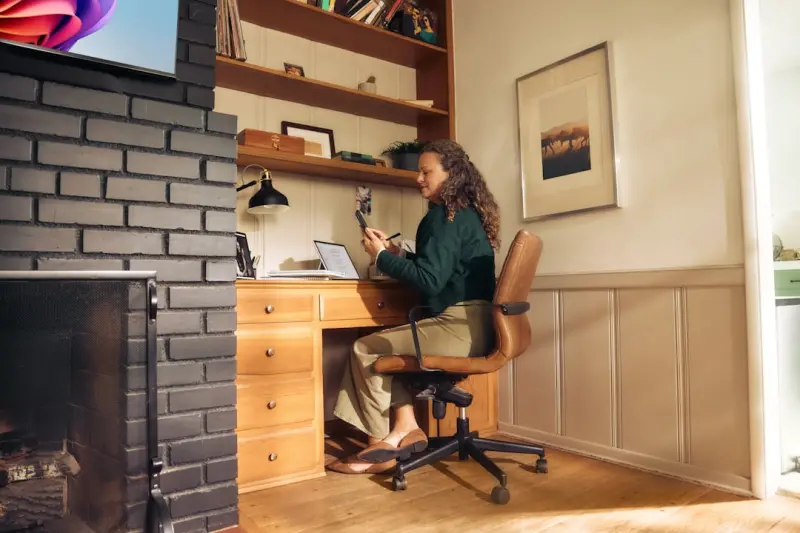
Why Your Home Should Be Your Most Powerful Productivity Ally
When I first moved into my downtown loft, the space felt more like a gallery than a workstation. I spent weeks wrestling with cables, hunting for quiet corners, and convincing myself that a “messy” kitchen island could double as a desk. Fast‑forward a few months, and I’ve learned that a home can be more than just a place to crash—it can be the engine that fuels your professional momentum. Below, I’m sharing the systems, habits, and low‑tech tricks that turned my chaotic pad into a high‑performing productivity hub.
Start with a Clear Map of Your Zones
Before you buy any gadgets or install shelves, sketch out a simple floor plan. Identify three core zones:
- Focus Zone: A dedicated area for deep work—no TV, no kitchen traffic.
- Transition Zone: A buffer space (like a hallway or entryway) where you can mentally switch from “home” to “work.”
- Recharge Zone: A spot for short breaks, stretching, or quick meditation.
Even a studio can accommodate these zones with clever furniture placement. The key is intentionality: each area should have a single primary purpose, reducing the mental overhead of deciding where to go next.
Invest in a “Desk‑Friendly” Furniture System
Traditional desks often become dumping grounds for paperwork, chargers, and that half‑empty coffee mug you keep “for later.” I swapped my bulky desk for a modular adjustable workstation that slides against the wall. The secret? A narrow rail system that lets you add or remove shelves without a screwdriver. When a new project lands on your desk, you simply slide a new tier into place. When it’s done, you slide it back out, keeping the visual field clean and the mind focused.
Control Light, Not Just Brightness
Natural light is a productivity booster, but most homes don’t get a full‑day sunbath. I installed a set of tunable LED panels that mimic the sunrise, mid‑day, and sunset spectra. By programming them to shift every few hours, my body’s circadian rhythm stays aligned, and I avoid the dreaded post‑lunch slump. The panels are also color‑temperature adjustable, so you can dial down the blue light when it’s time to unwind.
Declutter Digitally and Physically
Paper clutter is the silent productivity killer. I instituted a one‑in, two‑out rule for any new physical item that lands on my desk. If it’s a notebook, it gets digitized via a scanner app within 24 hours. For digital clutter, I use a “daily inbox zero” ritual: every evening, I archive, delete, or assign tasks to a project board. The result? A clear surface that mirrors a clear mind.
Master the Art of Micro‑Breaks
It’s tempting to power through meetings and emails, but the brain’s attention span peaks at roughly 90 minutes. I set a timer for 90‑minute work blocks, followed by a 10‑minute “reset.” During reset, I do one of three things:
- Stretch my calves and neck (no equipment needed).
- Step onto a tiny daily ritual like a scented breath exercise.
- Grab a glass of water and glance out a window for a visual pause.
This cadence keeps my cortisol levels in check and prevents the “brain fog” that often follows marathon work sessions.
Sound Management Without Going Full‑On “Quiet”
While some homeowners chase absolute silence, I found that a low‑level ambient soundtrack actually enhances focus. A simple white‑noise app or a playlist of “focus beats” drowns out the kitchen clatter without being intrusive. If you live in a bustling apartment, consider a thin DIY acoustic panel made from recycled felt—easy to hang and surprisingly effective at absorbing mid‑range frequencies.
Smart Power Management: The Unseen Energy Saver
Every charger and appliance draws “phantom” power even when idle. I installed a set of smart power strips that cut power to devices after a preset inactivity period. The strips also log usage, giving me monthly reports on which gadgets are energy hogs. Over a quarter, I shaved off roughly 12% of my electricity bill—a win for my wallet and the planet.
Streamline Your Home Office Tech Stack
Less is more. I keep my tech ecosystem to three core tools:
- Primary Laptop: Handles all heavy lifting and runs a single, cloud‑based workspace (Google Workspace or Microsoft 365).
- Secondary Tablet: Dedicated to reading, note‑taking, and quick research.
- Noise‑Canceling Headset: For calls, focus music, and occasional meditation.
Everything else—printers, external drives, extra monitors—gets stored in a “tech drawer” and only pulled out when a project explicitly demands it. This reduces decision fatigue and keeps the desk visually tidy.
Leverage “Habit Stacking” for Seamless Transitions
James Clear popularized habit stacking, and I’ve adapted it for the home office. For example:
- When I walk into the Focus Zone, I immediately turn on the desk lamp and launch my task manager.
- After my 90‑minute block ends, I press the “break” button on my timer, stand up, and stretch for exactly 60 seconds.
- Before I leave the Recharge Zone, I log a quick “win” in my journal—a short note on what got done.
These micro‑routines create a predictable rhythm, reducing the mental load of “what should I do next?”
Incorporate “Ambient Comfort Tweaks” for Sustained Energy
Small adjustments can make a massive difference over a full workday:
- Temperature: Keep your workspace at about 70°F (21°C). A personal fan or small heater can help fine‑tune the micro‑climate without heating or cooling the entire home.
- Ergonomics: Use a standing desk converter for part of the day, then sit for deep focus tasks. Alternate to keep circulation flowing.
- Air Quality: A compact HEPA filter or a few indoor plants (like snake plants) improve oxygen levels, keeping brain function sharp.
These tweaks are often overlooked, but they’re the silent power‑ups that keep you from hitting an energy slump mid‑afternoon.
Set Up “Boundaries” That Respect Your Time
If you share space with family or roommates, communicate your Focus Zone schedule clearly. I use a simple “Do Not Disturb” sign—a small wooden board that slides into view when I’m in deep work mode. It’s a visual cue that signals “I’m on a timer, please knock only for emergencies.” Over time, household members adapt, and interruptions drop dramatically.
Make the Entryway Your “Transition” Ally
The entryway often becomes a dumping ground for keys, mail, and shoes. Convert it into a purposeful transition space by adding:
- A small bench with a built‑in drawer for shoes.
- A wall-mounted organizer for mail and daily “to‑do” notes.
- A tray for tech accessories you need on your way out (phone charger, headphones).
When you arrive home, you physically move from “outside mode” to “home mode,” and the organized entryway cues your brain to shift gears—making it easier to jump into work or unwind, depending on the time of day.
Conclusion: The Home as a Dynamic Ally
Turning a living space into a productivity powerhouse isn’t about over‑engineering; it’s about thoughtful, incremental changes that align with how you naturally operate. By mapping zones, curating furniture, managing light and sound, and embedding micro‑break rituals, you create an environment that supports rather than saps your energy. The next time you sit down at your desk, notice how many of these systems are silently at work, keeping you in flow and ready to tackle the day’s challenges.

Brad Hays is a freelance writer known for his versatile skill set and ability to craft compelling content across a wide range of industries.
Related Posts

The Ultimate Entryway Overhaul: From Cluttered Hall to Calm Gateway
A step‑by‑step guide to turning a chaotic entryway into a serene, organized gateway using vertic... Read More
Micro-Comfort Zones: Tiny Retreats for Everyday Joy
Learn how to create small, intentional comfort spots throughout your home that enhance calm, improve... Read More

Reimagining Your Home: Simple Shifts for a Calmer, More Productive Space
A practical guide to transforming everyday home spaces with small, intentional changes—from defini... Read More
Top Posts

From My Garden Desk: Jimmy Damon’s Blueprint for the New Era of Employment
Jimmy Damon shares his journey of transforming a garden into a thriving workspace, highlighting flexibility, productivity boosts, and the future of remote emplo...Read More

From Gateways to Growth Labs: Turning Transit Hubs into Personal Innovation Studios
Learn to repurpose airports, train stations, and cafés into micro‑learning labs, community hubs, and sensory reset zones, turning every layover into a cataly...Read More
Turning Your Travel Bag into a Portable Creative Lab
Learn to transform your travel bag into a compact creative lab, blending exploration with on‑the‑go recording, sketching, and content creation for lasting, ...Read More

Micro‑Habits That Supercharge Your Longevity
David Moore explains how tiny, two‑minute actions—like calf raises while waiting for a meeting or a spoonful of chia in your coffee—compound over time to ...Read More
0 Comments
Post Comment
You will need to Login or Register to comment on this post!